Showing posts with label Qt Mobility Development. Show all posts

Tuesday, June 21, 2011

NewsPopper - Read your favorite news sites and share them! [Early prototypes & sketches]

With NewsPopper, you can get the latest news easily from favorite sites that interests you, and share among your friends.
Set up alerts so NewsPopper --as it name says-- will "pop" the news for you on your mobile device!
You can get notified when your friend comments on the news they read, or liked.

Sounds interesting ? It should :-)

It's a mobile application I'm currently working on. The app uses the latest powerful Qt 1.1 SDK and will run on all mobile devices that support Qt framework (which means modern Symbian S60, Symbian^3, Maemo/N900, and MeeGo devices like the upcoming Nokia N9/N950).

It will support touch and swipe gestures (on all touch devices and especially on the Nokia N9) and should be very user friendly from the first start.

The images shown are some sketches and how the current prototype looks.

When it's finished (hopefully!) you'll find it in an Ovi Store near you. :-)


I highly recommend you to get these resources to gain skills on Qt Development on desktop and mobile devices :

  1. C++ GUI Programming with Qt 4 (2nd Edition) - Prentice Hall
  2. Beginning Nokia Apps Development: Qt and HTML5 for Symbian and MeeGo
  3. Foundations of Qt Development
  4. Advanced Qt Programming: Creating Great Software with C++ and Qt 4

Thursday, June 10, 2010

Installing Qt Mobility Final Libraries on Windows 7

By following this article, you should be ready to develop Qt Mobility applications on Windows.

Note: This is only for Qt for Windows installation. If you want to develop Qt applications for Symbian on Windows, click here.
  1. Install Qt SDK 4.6.3 + Qt Creator 1.3.1 for Windows.
  2. Install Strawberry Perl for Windows (~ 32 MB). The reason why Perl is needed is covered in the later in this article.
  3. Download Qt Mobility library sources.
  4. Unpack Qt Mobility source distribution into a drive, e.g. C:\. This will create C:\qtmobility\qt-mobility-opensource-src-1.0.0
  5. Launch Qt Command Prompt.
    IMPORTANT: You cannot use regular Command Prompt!
  6. Set the PATH to Strawberry Perl : (do not skip this!)


    set PATH=%PATH%;C:\strawberry\perl\bin
    
  7. Go to your Qt Mobility source folder and run configure:


    cd \qt-mobility-opensource-src-1.0.0
    configure
    
    This will configure Qt Mobility build with default target directory: C:\QtMobility

  8. Build Qt Mobility:


    mingw32-make
    mingw32-make install
  9. Add C:\QtMobility\lib folder (the target folder) to your PATH environment variable (more on this below).
  10. To add Qt Mobility documentation in Qt Creator: Go to Tools -> Options -> Help -> Add. Then browse C:\QtMobility/doc/qch/qtmobility.qch. 
Now you're ready to develop with Qt Mobility on Windows. Check out Qt Mobility Quickstart App for an example.


Setting Environment Variables

In order to use Qt Mobility some environment variables need to be extended to locate the libraries, which are placed in the lib directory of the install path.

On Windows: PATH should be extended to include: C:\%TARGET_DIR%\lib

On my setup this folder is: C:\QtMobility\lib


PATH can be extended through Start -> Settings -> Control Panel -> System -> Advanced -> Environment variables. Under System variables, select "PATH", click "Edit..." and append your Qt Mobility lib folder.

Reboot your system to apply your changes to system environment variables.

You're now ready to develop Qt Mobility applications in Windows. :-)

See also:

Tuesday, March 30, 2010

View Qt Mobility Documentation inside Qt Creator

Qt Mobility distribution (download here) provides both HTML documentation and also .qch documentation, which is accessible from Qt Creator.

You should make use of it, since it provides convenient Index, Contents, Bookmarks, and other Qt Help features.

To add Qt Mobility documentation to Qt Creator:
  1. In Qt Creator, go to Tools -> Options -> Help.
  2. Click Add button. Then browse to your unpack Qt Mobility distribution folder, go to doc folder and choose qtmobility.qch. Click OK to close the dialog box.
Click the Help pane (Ctrl+5). You should now be able to access Qt Mobility user guide & documentation right inside Qt Creator.

If you want to learn more about Qt development & programming, I highly recommend C++ GUI Programming with Qt 4 (2nd Edition).

Friday, January 29, 2010

Troubleshooting Qt Mobility Messaging for Symbian

My issue is compiling a Qt Mobility Messaging app for the WINSCW is not working. Qt Contacts work fine.

It seems to complain about two header files (only): qmessageglobal.h and qmessagedatacomparator.h

Other Qt Mobility headers are properly in C:\S60\devices\S60_3rd_FP2_SDK_v1.1\epoc32\include

Error messages:

make -r -f "\S60\devices\S60_3rd_FP2_SDK_v1.1\EPOC32\BUILD\Users\ceefour\Documents\qtcontest\message-merge\WINSCW.make" MAKEFILE VERBOSE=-s
WARNING: Can't find following headers in System Include Path
<qmessageglobal.h> <qmessageglobal.h> <qmessageglobal.h> <qmessageglobal.h> <qmessageglobal.h> <qmessageglobal.h> <qmessageglobal.h> <qmessageglobal.h> <qmessageglobal.h> <qmessageglobal.h> <qmessagedatacomparator.h> <qmessageglobal.h> <qmessagedatacomparator.h> <qmessageglobal.h> <qmessagedatacomparator.h> <qmessageglobal.h> <qmessageglobal.h> <qmessageglobal.h> <qmessageglobal.h> <qmessageglobal.h>
(Sys Inc Paths "\Qt\4.6.1-symbian\include\QtCore\" "\Qt\4.6.1-symbian\include\QtCore\tmp\" "\Qt\4.6.1-symbian\include\QtGui\" "\Qt\4.6.1-symbian\include\QtGui\tmp\" "\Qt\4.6.1-symbian\include\" "\Qt\4.6.1-symbian\include\tmp\" "\Users\ceefour\Documents\qtcontest\message-merge\" "\Users\ceefour\Documents\qtcontest\message-merge\tmp\" "\Qt\4.6.1-symbian\mkspecs\common\symbian\" "\Qt\4.6.1-symbian\mkspecs\common\symbian\tmp\" "\S60\devices\S60_3rd_FP2_SDK_v1.1\epoc32\include\" "\S60\devices\S60_3rd_FP2_SDK_v1.1\epoc32\include\stdapis\" "\S60\devices\S60_3rd_FP2_SDK_v1.1\epoc32\include\stdapis\sys\" "\S60\devices\S60_3rd_FP2_SDK_v1.1\epoc32\include\stdapis\stlport\" "\S60\devices\S60_3rd_FP2_SDK_v1.1\epoc32\include\variant")
Dependency list for "\Users\ceefour\Documents\qtcontest\message-merge\mainwizard.cpp" may be incomplete


Basically the errors boil down to :

the file 'qmessageglobal.h' cannot be opened

Solution

Make sure you've already added to the .pro file :

CONFIG += mobility
MOBILITY += messaging

You need to #include <qtmessaging.h> instead of individual qmessage* header files.

Then if it complains:

WARNING: Can't find following headers in System Include Path
<qtmessaging.h>
qtmessaging.h: No such file or directory

This means you have not configured Qt Mobility Messaging properly. (copying headers happened in "configure" stage, not "make")

Redo the configure, and check that you have qtmessaging.h in C:\S60\devices\S60_3rd_FP2_SDK_v1.1\epoc32\include

If it still doesn't show up, like in my case, there's a hack/workaround. Copy the following files manually from C:\QtMobility\src\messaging to C:\S60\devices\S60_3rd_FP2_SDK_v1.1\epoc32\include :
  • qtmessaging.h
  • qmessageglobal.h
  • qmessagedatacomparator.h
Assuming Qt Mobility Messaging was built successfully, at least in my case, my Qt Mobility Messaging app works fine.

Sunday, January 24, 2010

Qt Mobility Messaging API on Windows

Qt Mobility Messaging API on Windows supports the MAPI messaging standard. However, this isn't straightforward to set up, as the Qt Mobility documentation states:
On Microsoft Windows, MAPI header files are required to be installed, we recommend installing Visual Studio Express for this purpose.

So what should we do?

I've posted a question on Forum Nokia here.

Qt Mobility Messaging API on Linux

Getting Qt Mobility Messaging API to work on Linux (my Ubuntu Karmic Koala 9.10 system) needs some tricks.

The easiest way of test your setup is by compiling the Qt Mobility example writemessage.

Using my initial installation of Qt Mobility I got this error:
Starting: /usr/bin/make -w
.......
/usr/bin/ld: cannot find -lQtMessaging_tp
collect2: ld returned 1 exit status
make: *** [message-merge] Error 1
Exited with code 2.
Error while building project message-merge
When executing build step 'Make'

The most important error message is "cannot find -lQtMessaging_tp" which means that Qt Mobility Messaging library has not been properly built.


Qt Mobility on Linux requires QMF.


The Qt Mobility Messaging API documentation points this out:


On Linux QMF is required to be installed and the QMF_INCLUDEDIR and QMF_LIBDIR environment variables set to the messagingframework/src/libraries/qtopiamail and build/messagingframework/image/lib directories respectively.

To install QMF, checkout the latest QMF from Gitorious:
git clone git://gitorious.org/qt-labs/messagingframework.git qt-messagingframework
If you don't have git or don't want to use it, you can also download QMF as tarball archive.
Then build it:
export PATH=/opt/qtsdk-2010.01/qt/bin:$PATH
qmake "QMF_INSTALL_ROOT=$PWD/image" qmf.pro
make
make install
Now you need to rebuild Qt Mobility with Messaging (QMF) support (change paths as necessary):

export PATH=/opt/qtsdk-2010.01/qt/bin:$PATH
export QMF_INCLUDEDIR=/opt/qt-messagingframework/src/libraries/qtopiamail
export QMF_LIBDIR=/opt/qt-messagingframework/image/lib
./configure
make
make install
Make sure it says "Checking QMF ... OK" during configure.
Add the following to your $HOME/.profile script:
necessary):
# Qt Mobility
export LD_LIBRARY_PATH=$LD_LIBRARY_PATH:/opt/qt-mobility-src-1.0.0-tp2/install/lib:/opt/qt-messagingframework/image/lib
export QMF_INCLUDEDIR=/opt/qt-messagingframework/src/libraries/qtopiamail
export QMF_LIBDIR=/opt/qt-messagingframework/image/lib
Once Qt Mobility Messaging + QMF is set, to use it add the following to your .pro project file:
CONFIG += mobility
MOBILITY = messaging
The writemessage example additionally uses the following workaround to link QMF library:
symbian|win32 {
} else {
# Temporarily link against local qtopiamail lib (should be part of the platform)
LIBS += -L $$(QMF_LIBDIR) -lqtopiamail
}
Then you should be set.

Troubleshooting

If you get this error while building a Qt Mobility Messaging app:
/usr/bin/ld: warning: libqtopiamail.so.1, needed by /opt/qt-mobility-src-1.0.0-tp2/install/lib/libQtMessaging_tp.so, not found (try using -rpath or -rpath-link)
/opt/qt-mobility-src-1.0.0-tp2/install/lib/libQtMessaging_tp.so: undefined reference to `QMailAccountKey::operator|=(QMailAccountKey const&)'
It means you have built Qt Mobility Messaging module properly, but you haven't specified the library path to QMF. See above workaround to link QMF library.
If you get this error when running a Qt Mobility Messaging app:
error while loading shared libraries: libqtopiamail.so.1: cannot open shared object file: No such file or directory
exited with code 127
It means you haven't set QMF_LIBDIR properly. If you have, you may need to restart your computer.

Friday, January 22, 2010

Qt Creator 1.3.1 and Qt 4.6.1 Released

Straight from Nokia's Press Release:


Oslo, 19 January 2010 – Nokia today released version 4.6.1 of Qt: the cross-platform application and UI framework, and version 1.3.1 of Qt Creator: the cross-platform IDE for Qt development .  Qt 4.6.1 brings improvements to developers targeting Symbian, most notably introducing a binary compatibility guarantee as announced with the Qt 4.6.0 release in December 2009.  Both releases introduce bug fixes and optimizations made since the Qt 4.6.0 and Qt Creator 1.3.0 releases.

Also released today are updates to the Qt Visual Studio Add-in and Qt Eclipse Integration, as well as an updated build of the Qt SDK.  All Qt releases are available for download from http://qt.nokia.com/downloads.

Binary Compatibility Guarantee on Symbian
Qt 4.6.1 brings a binary compatibility guarantee for applications built for the Symbian platform, as announced with the release of Qt 4.6.0.  For more information, visit http://qt.nokia.com/products/platform/symbian.

Qt Beta for Maemo 5 Also Released
A Beta of the Qt port to Maemo 5 is now available for download, testing and feedback.  For more information, visit http://qt.nokia.com/developer/qt-for-maemo-developers.

For a detailed list of changes introduced with Qt 4.6.1, consult the changes file found in the packages, or browse the information contained in the Qt Developer Zone at: http://qt.nokia.com/developer/changes/changes-4.6.1. A detailed list of changes in Qt Creator 1.3.1 is available at: http://qt.nokia.com/developer/changes/changes-qtcreator-1.3.1.

Wednesday, January 6, 2010

Useful Qt Mobility & Symbian S60 Development Links

Moved to Qt Mobility Links & Resources page.

Installing Qt Mobility Libraries on Windows 7

UPDATE: This article is obsolete. Please refer to the latest article, Installing Qt Mobility Final Libraries on Windows 7.

By following this article, you should be ready to develop Qt Mobility applications on Windows.

Note: This is only for Qt for Windows installation. If you want to develop Qt applications for Symbian on Windows, click here.
  1. Install Qt SDK 4.6 + Qt Creator 1.3 for Windows.
  2. Install Strawberry Perl for Windows (~ 32 MB). The reason why Perl is needed is covered in the later in this article.
  3. Download Qt Mobility library sources.
  4. Unpack Qt Mobility source distribution into a folder without spaces, e.g. C:\qtmobility
  5. Apply this patch to config.tests/make/make.pro. You can use patch tool, but you can edit the file manually (view the patch to see changes).
  6. Launch Qt Command Prompt
  7. Set the PATH to Strawberry Perl :


    set PATH=%PATH%;C:\strawberry\perl\bin
    

  8. Go to your Qt Mobility folder and run configure:


    cd \qtmobility
    configure
    
    This will configure Qt Mobility build with default target directory: C:\QtMobility

  9. Build Qt Mobility:


    mingw32-make
    mingw32-make install

  10. Add C:\qtmobility\lib folder to your PATH environment variable (more on this below).
  11. To add Qt Mobility documentation in Qt Creator: Go to Tools -> Options -> Help -> Add. Then browse C:\qtmobility/doc/qch/qtmobility.qch. 
Now you're ready to develop with Qt Mobility on Windows. Check out Qt Mobility Quickstart App for an example.


Setting Environment Variables

In order to use Qt Mobility some environment variables need to be extended to locate the libraries, which are placed in the lib directory of the install path.

On Windows: PATH should be extended to include: C:\%TARGET_DIR%\lib

On my setup this folder is: C:\qt-mobility-src-1.0.0-tp2\lib


PATH can be extended through Start -> Settings -> Control Panel -> System -> Advanced -> Environment variables. Under System variables, select "PATH", click "Edit..." and append your Qt Mobility lib folder.

Reboot your system to apply your changes to system environment variables.

You're now ready to develop Qt Mobility applications in Windows. :-)

Problems I Encountered... So You Don' Have To


I first tried to unpack Qt Mobility into My Documents, but I can't compile it:
C:\Users\ceefour\Documents\qt-mobility-src-1.0.0-tp2>configure
C:\Users\ceefour\Documents\qt-mobility-src-1.0.0-tp2
Checking available Qt
4.6.0
Checking make
 "Cannot find 'nmake', 'mingw32-make' or 'make' in your PATH"
 "Aborting."
I tried to move it to a top-level folder (C:\qtmobility) but still getting the same error.

After reading Forum Nokia thread: Qt Mobility problem, I tried to reboot my computer, but didn't help. There's also steps to install Qt Mobility for Symbian.

After further investigation leads me that configure determines its expected build system to be symbian-sbsv2 based on running qmake on config.tests\make\make.pro :
C:\qt-mobility-src-1.0.0-tp2>qmake config.tests\make\make.pro
Project MESSAGE: symbian-sbsv2

C:\qt-mobility-src-1.0.0-tp2>make
'make' is not recognized as an internal or external command,
operable program or batch file.
So it's looking for make.exe, which doesn't exist on my system.

I harcoded BUILDSYSTEM=win32-mingw by patching configure.bat here:
...
    for /f "tokens=3" %%i in ('%QT_PATH%qmake %SOURCE_PATH%\config.tests\make\make.pro 2^>^&1 1^>NUL') do set BUILDSYSTEM=%%i

    set BUILDSYSTEM=win32-mingw

    if %BUILDSYSTEM% == symbian-abld (
...
Update: Use this patch.

and now configure seem to work...
C:\qt-mobility-src-1.0.0-tp2>configure
C:\qt-mobility-src-1.0.0-tp2
Checking available Qt
4.6.0
Checking make
hello
... mingw32-make found.

Start of compile tests
Checking LBT
'Y_MAKEPROJECT_LOG' is not recognized as an internal or external command,
operable program or batch file.
... Not Found
'compile' is not recognized as an internal or external command,
operable program or batch file.


"Generating Mobility Headers..."
The system cannot find the file specified.
'perl' is not recognized as an internal or external command,
operable program or batch file.
'perl' is not recognized as an internal or external command,
operable program or batch file.
'perl' is not recognized as an internal or external command,
operable program or batch file.
'perl' is not recognized as an internal or external command,
operable program or batch file.
'perl' is not recognized as an internal or external command,
operable program or batch file.
'perl' is not recognized as an internal or external command,
operable program or batch file.
'perl' is not recognized as an internal or external command,
operable program or batch file.
'perl' is not recognized as an internal or external command,
operable program or batch file.
'perl' is not recognized as an internal or external command,
operable program or batch file.

Running qmake...
Reading C:/qt-mobility-src-1.0.0-tp2/src/src.pro
 Reading C:/qt-mobility-src-1.0.0-tp2/src/global/global.pro
 Reading C:/qt-mobility-src-1.0.0-tp2/src/serviceframework/serviceframework.pro
 Reading C:/qt-mobility-src-1.0.0-tp2/src/bearer/bearer.pro
 Reading C:/qt-mobility-src-1.0.0-tp2/src/location/location.pro
 Reading C:/qt-mobility-src-1.0.0-tp2/src/contacts/contacts.pro
 Reading C:/qt-mobility-src-1.0.0-tp2/src/multimedia/multimedia.pro
 Reading C:/qt-mobility-src-1.0.0-tp2/src/publishsubscribe/publishsubscribe.pro
 Reading C:/qt-mobility-src-1.0.0-tp2/src/versit/versit.pro
 Reading C:/qt-mobility-src-1.0.0-tp2/src/systeminfo/systeminfo.pro
Reading C:/qt-mobility-src-1.0.0-tp2/tools/tools.pro
 Reading C:/qt-mobility-src-1.0.0-tp2/tools/servicefw/servicefw.pro
 Reading C:/qt-mobility-src-1.0.0-tp2/tools/servicexmlgen/servicexmlgen.pro
 Reading C:/qt-mobility-src-1.0.0-tp2/tools/vsexplorer/vsexplorer.pro
 Reading C:/qt-mobility-src-1.0.0-tp2/tools/qcrmlgen/qcrmlgen.pro
Reading C:/qt-mobility-src-1.0.0-tp2/plugins/plugins.pro
 Reading C:/qt-mobility-src-1.0.0-tp2/plugins/contacts/contacts.pro
 Reading C:/qt-mobility-src-1.0.0-tp2/plugins/multimedia/multimedia.pro
  Reading C:/qt-mobility-src-1.0.0-tp2/plugins/multimedia/m3u/m3u.pro
  Reading C:/qt-mobility-src-1.0.0-tp2/plugins/multimedia/phonon/phonon.pro
  Reading C:/qt-mobility-src-1.0.0-tp2/plugins/multimedia/audiocapture/audiocapt
ure.pro
Reading C:/qt-mobility-src-1.0.0-tp2/doc/doc.pro
 Reading C:/qt-mobility-src-1.0.0-tp2/doc/src/snippets/snippets.pro
  Reading C:/qt-mobility-src-1.0.0-tp2/doc/src/snippets/qtcontactsdocsample/qtco
ntactsdocsample.pro

configure has finished. You may run mingw32-make to build the project now.
Time to run mingw32-make and pray:
...
g++ -c -O2 -frtti -fexceptions -mthreads -Wall -DUNICODE -DQT_LARGEFILE_SUPPORT
-DQT_DLL -DQT_NO_DEBUG -DQT_GUI_LIB -DQT_CORE_LIB -DQT_THREAD_SUPPORT -DQT_NEEDS
_QMAIN -I"c:\Qt\2009.05\qt\include\QtCore" -I"c:\Qt\2009.05\qt\include\QtGui" -I
"c:\Qt\2009.05\qt\include" -I"c:\Qt\2009.05\qt\include\QtContacts_tp" -I"..\..\.
.\..\src\global" -I"..\..\..\..\src\contacts" -I"..\..\..\..\src\contacts\reques
ts" -I"..\..\..\..\src\contacts\filters" -I"..\..\..\..\src\contacts\details" -I
"c:\QtMobility\include" -I"c:\Qt\2009.05\qt\include\ActiveQt" -I"..\..\..\..\bui
ld\Release\qtcontactsdocsample\moc" -I"c:\Qt\2009.05\qt\mkspecs\win32-g++" -o ..
\..\..\..\build\Release\qtcontactsdocsample\moc_requestexample.o ..\..\..\..\bui
ld\Release\qtcontactsdocsample\moc\moc_requestexample.cpp
g++ -enable-stdcall-fixup -Wl,-enable-auto-import -Wl,-enable-runtime-pseudo-rel
oc -Wl,-s -mthreads -Wl -Wl,-subsystem,windows -o ..\..\..\..\bin\examples\qtcon
tactsdocsample.exe ../../../../build/Release/qtcontactsdocsample/qtcontactsdocsa
mple.o ../../../../build/Release/qtcontactsdocsample/moc_requestexample.o  -L"c:
\Qt\2009.05\qt\lib" -lmingw32 -lqtmain -LC:\qt-mobility-src-1.0.0-tp2/lib -LC:\Q
tMobility/lib -lQtContacts_tp -lQtGui4 -lQtCore4
mingw32-make[4]: Leaving directory `C:/qt-mobility-src-1.0.0-tp2/doc/src/snippet
s/qtcontactsdocsample'
mingw32-make[3]: Leaving directory `C:/qt-mobility-src-1.0.0-tp2/doc/src/snippet
s/qtcontactsdocsample'
mingw32-make[2]: Leaving directory `C:/qt-mobility-src-1.0.0-tp2/doc/src/snippet
s'
mingw32-make[1]: Leaving directory `C:/qt-mobility-src-1.0.0-tp2/doc'

C:\qt-mobility-src-1.0.0-tp2>_
The build took a few minutes and it seems everything's fine.

P.S.: I could have just "given up" and install Symbian S60 SDK first. :-)

Compiling Qt Mobility with Debug enabled

If you try to develop a Qt Mobility app and using the Debug configuration (which is default), you'll get errors similar to these:

Running build steps for project locale-qt...
Starting: c:/qt/2009.05/qt/bin/qmake.exe C:/Users/ceefour/Documents/locale-qt/locale-qt.pro -spec win32-g++ -r
Exited with code 0.
Starting: C:/Qt/2009.05/mingw/bin/mingw32-make.exe -w
mingw32-make: Entering directory `C:/Users/ceefour/Documents/locale-qt'
C:/Qt/2009.05/mingw/bin/mingw32-make -f Makefile.Debug
mingw32-make[1]: Entering directory `C:/Users/ceefour/Documents/locale-qt'
g++ -enable-stdcall-fixup -Wl,-enable-auto-import -Wl,-enable-runtime-pseudo-reloc -mthreads -Wl -Wl,-subsystem,windows -o debug\locale-qt.exe debug/main.o debug/mainwindow.o debug/moc_mainwindow.o -L"c:\Qt\2009.05\qt\lib" -lmingw32 -lqtmaind -LC:\qtmobility/lib -lQtSystemInfo_tpd -lQtGuid4 -lQtNetworkd4 -lQtCored4
mingw32-make[1]: Leaving directory `C:/Users/ceefour/Documents/locale-qt'
mingw32-make: Leaving directory `C:/Users/ceefour/Documents/locale-qt'
c:/qt/2009.05/mingw/bin/../lib/gcc/mingw32/4.4.0/../../../../mingw32/bin/ld.exe: cannot find -lQtSystemInfo_tpd
collect2: ld returned 1 exit status
mingw32-make[1]: *** [debug\locale-qt.exe] Error 1
mingw32-make: *** [debug] Error 2
Exited with code 2.
Error while building project locale-qt
When executing build step 'Make'

You have two choices:
  1. Build your project using Release configuration.
  2. Build Qt Mobility with Debug enabled as well.
To build Qt Mobility with Debug enabled, simply add the argument -debug to configure in the steps above:

configure -debug

Then repeat the build process as usual.

Installing Perl


I noticed some errors early in the "configure" process:
"Generating Mobility Headers..."
Access is denied.
'perl' is not recognized as an internal or external command,
operable program or batch file.
...
This is one reason why I hate hesitate to use Windows. Qt Mobility's include folder, which should contain the header files, is still empty. Time to install a Perl interpreter.

Get Strawberry Perl for Windows (~ 32 MB).

Strawberry Perl automatically adds itself to your PATH system variable, you can check this by running perl -v :
C:\strawberry>perl -v

This is perl, v5.10.1 (*) built for MSWin32-x86-multi-thread

Copyright 1987-2009, Larry Wall

Perl may be copied only under the terms of either the Artistic License or the
GNU General Public License, which may be found in the Perl 5 source kit.

Complete documentation for Perl, including FAQ lists, should be found on
this system using "man perl" or "perldoc perl".  If you have access to the
Internet, point your browser at http://www.perl.org/, the Perl Home Page.
Unfortunately, Qt Command Prompt sets its own PATH environment variable, overriding. Before running configure, do:
set PATH=%PATH%;C:\strawberry\perl\bin
Now you can configure and build Qt Mobility on Windows properly.

See also:

Tuesday, December 29, 2009

Qt Mobility Quickstart App

After successfully (though somewhat painfully) building Qt Mobility 1.0 Tech Preview 2, I'm ready to write and run my first Qt Mobility Application.

Okay... technically not my app, but the app from the Qt Mobility Quickstart example.

Building Qt Mobility Quickstart App

  1. Make sure to install Qt Mobility and set LD_LIBRARY_PATH environment variable to point to your Qt Mobility install/lib folder.
  2. Create a new Qt GUI Project. If you need help here, refer to Hello World Qt GUI App.
  3. Paste the following code into main.cpp :


    #include <QApplication>
    #include <QLabel>
    
    #ifdef Q_OS_SYMBIAN
    #include <qsysteminfo.h>
    #else
    #include <QSystemInfo> //(1)
    #endif
    using namespace QtMobility; //(2)
    
    int main(int argc, char *argv[])
    {
        QApplication app(argc, argv);
        QSystemInfo s;
        QLabel *label = new QLabel(QObject::tr("hello ").append(s.currentCountryCode()));
        label->show();
        label->resize(100,30);
        return app.exec();
    }


  4. Qt Mobility Quickstart tutorial tells you to add this to your project's .pro file:


    CONFIG += mobility
    MOBILITY += systeminfo


  5. Build the project...
  6. At this point I get this error with QNetworkInterface:


    g++ -c -pipe -g -Wall -W -D_REENTRANT -DQT_GUI_LIB -DQT_CORE_LIB -DQT_SHARED -I/usr/local/Trolltech/Qt-4.6.0/mkspecs/linux-g++ -I. -I/usr/local/Trolltech/Qt-4.6.0/include/QtCore -I/usr/local/Trolltech/Qt-4.6.0/include/QtGui -I/usr/local/Trolltech/Qt-4.6.0/include -I/usr/local/Trolltech/Qt-4.6.0/include/QtSystemInfo_tp -I/opt/qt-mobility-src-1.0.0-tp2/install/include -I. -o main.o main.cpp
    In file included from /opt/qt-mobility-src-1.0.0-tp2/install/include/QSystemInfo:1,
    from main.cpp:7:
    /opt/qt-mobility-src-1.0.0-tp2/install/include/qsysteminfo.h:50:29: error: QNetworkInterface: No such file or directory
    In file included from /opt/qt-mobility-src-1.0.0-tp2/install/include/QSystemInfo:1,
    from main.cpp:7:
    /opt/qt-mobility-src-1.0.0-tp2/install/include/qsysteminfo.h:183: error: ‘QNetworkInterface’ does not name a type
    make: Leaving directory `/home/ceefour/Sandbox/quickstart-mobility'
    make: *** [main.o] Error 1
    Exited with code 2.
    Error while building project quickstart-mobility
    When executing build step 'Make'


  7. Seems like Qt Mobility tutorial writer forgot to add dependency to network module that provides QNetworkInterface. Add the following to your .pro file:


    QT       += network


  8. Run the project.

Qt Mobility Quickstart in Action

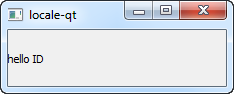
The Quickstart project displays the following very simple dialog:


It looks very simple and harmless, yet it's so powerful.

Why powerful? Because you can build this very same app for all platforms supported by Qt Mobility, and it'll work just as well... that is, displaying the current locale.

Don't believe me? Build and run exactly the same source code on Windows (no changes whatsoever) and voila!


For those who have programmed in Java, this is similar to Java Mobile Edition (J2ME). The primary benefits are:
  • It's natively compiled. Therefore, the app runs optimally in all devices and platforms.
  • It uses the same underlying library: Qt library and Qt GUI widget toolkit. Unlike Java where you'll use Swing or SWT on the desktop, and Java ME widgets on the client. In all Qt Mobility platforms, you use Qt GUI.
  • No need for a Java Runtime Engine (JRE). Most Qt applications are dynamically linked with Qt shared libraries for size and other reasons. You can also statically link Qt libraries for platforms that doesn't have Qt preinstalled. In that regard, Qt app (therefore, Qt Mobility app) is indistinguishable from that platform's native apps.

About LD_LIBRARY_PATH


If you don't set LD_LIBRARY_PATH properly, your app still builds successfullly. However, you will encounter the following error when running the app:

/home/ceefour/Sandbox/quickstart-mobility/quickstart-mobility: error while loading shared libraries: libQtSystemInfo_tp.so.1: cannot open shared object file: No such file or directory

Error messages on Windows are slightly different, but same meaning: it cannot find the required binary library files.

c:/qt/2009.05/mingw/bin/../lib/gcc/mingw32/4.4.0/../../../../mingw32/bin/ld.exe: cannot find -lQtSystemInfo_tpd
collect2: ld returned 1 exit status

To resolve this problem, either add the following to $HOME/.bashrc and restart your computer:

# Qt Mobility
export LD_LIBRARY_PATH=$LD_LIBRARY_PATH:/opt/qt-mobility-src-1.0.0-tp2/install/lib

or, set LD_LIBRARY_PATH from your project settings (not recommended):
  1. Switch to Projects mode (Ctrl+4).
  2. Choose your project.
  3. Under Build Environment, click Show Details.


  4. Select LD_LIBRARY_PATH, click Edit, and append (separated by colon ":") your Qt Mobility path there, e.g. :/opt/qt-mobility-src-1.0.0-tp2/install/lib
Run the app now and it should work fine.

Monday, December 28, 2009

Qt Mobility API Features & Target Platforms

Qt Mobility is part of Qt's emerging new APIs.

Although it's obviously targeted for mobile devices, some of the specs are implemented on desktop platforms.

Target platforms supported by Qt Mobility:
  • Symbian S60 3rd & 5th Edition (pretty good)
  • Maemo
  • Linux/X11
  • Windows
  • OS X (Mac)
All target platforms support these features:
  • Service Framework
  • Bearer
  • Publish/Subscribe
  • System Information
Messaging feature is "half complete", on Symbian S60 the spec is partially implemented, on Linux/Mac it needs QMF, Windows needs Outlook & MAPI.

Currently, only mobile devices (Symbian S60 3rd Edition and 5th Edition) support these APIs:
  • Contacts
  • Location
Qt encourages independent vendors to develop engines/providers for these specs on desktop systems (Windows/Linux/Mac), however documentation for how to do so currently does not exist.

These APIs are incompletely implemented or non-existent in all platforms:
  • Multimedia